Crazy Cars Unblocked — Play Free Online
More Runners & Driving games




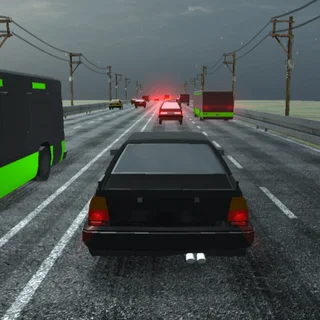
Crazy Cars unblocked: play Crazy Cars online free right here in your browser — no download, no sign-up, works on a school Chromebook.
Crazy Cars is a vibrant 3D stunt driving game that drops you straight into a giant obstacle playground filled with launch ramps, loop tracks, and high-altitude platforms. Instead of sticking to a traditional race track with laps and finish lines, the game gives you total freedom to test vehicle physics, launch off mega jumps, and collect tokens scattered across the arena.
Sessions are fast, arcade-focused, and immediate. The responsive handling makes it easy to pick up speed quickly, drift around tight bends, and catch air off steep inclines. Fans of quick-reflex browser titles on Wormate will appreciate the instant restarts and smooth momentum, making it a great palate cleanser between longer multiplayer rounds.
How to play
Driving in Crazy Cars is straightforward and relies on standard keyboard inputs:
- Steering and throttle: Use the Left and Right arrow keys or A and D to steer your vehicle. Press the Up arrow or W to accelerate forward, and Down arrow or S to reverse or brake.
- Jumps and stunts: Hit Spacebar or Up arrow to launch your car over gaps and obstacles when approaching launch ramps at high speed.
- Recovery: If your vehicle flips over, gets wedged in an obstacle, or falls off an elevated track, press the restart prompt to instantly respawn on solid ground.
As you explore the playground, search for collectible items, wrenches, and coins placed in hard-to-reach spots. Gathering these rewards lets you unlock heavier monster trucks, nimble sports cars, and off-road vehicles with different speed and suspension characteristics.
Tips for cleaner stunts
Getting the most out of every run requires a mix of speed management and platform awareness:
- Straighten out before launching: Hitting a ramp at an awkward angle causes your car to spin out in midair. Align your wheels before leaving the ramp edge for predictable landings.
- Regulate your speed on narrow bridges: Full throttle works on wide launch zones, but high platforms require gentle tap steering so you do not overshoot the roadway.
- Use quick resets: Do not waste time trying to wiggle free from awkward corners; an instant respawn preserves your session flow.
Similar games on Wormate
If you enjoy the fast reflexes and driving mechanics of Crazy Cars, try Drift Boss for precision one-touch cornering on floating tracks. Players looking for multiplayer arena competition can jump into Wormate to grow the largest snake on the board, or try Paper.io 2 for quick territorial conquest.
Crazy Cars runs directly in your web browser with no downloads or account registration required. It is well-suited for quick gaming breaks on laptops, desktop setups, and Chromebooks.
Questions about Crazy Cars
Is Crazy Cars unblocked at school?
Crazy Cars runs in an ordinary browser tab from wormate.org, with nothing to download or install, so it plays on most school Chromebooks and work computers. If a network filter blocks the site, only that network's administrator can change it.
What are the controls for Crazy Cars?
Use the arrow keys or WASD to accelerate, steer, and reverse. Use Spacebar or Up arrow to jump over obstacles, and tap any key to reset your car after a crash.
How do you unlock new vehicles in Crazy Cars?
Explore the stunt arena to collect stars, coins, and wrenches placed on ramps and elevated tracks. You can spend these collected rewards to unlock new cars.
Can I play Crazy Cars on a Chromebook or laptop?
Yes, Crazy Cars runs directly in any modern desktop or Chromebook web browser using HTML5, requiring no file downloads or plugin installations.