Wormate Objectives, Levels and Skins: What Unlocks What
Published · 2 min read
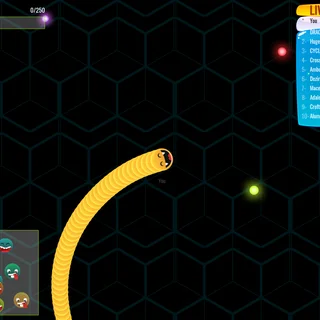
The Wormate game on this site has more going on than the arena: a level bar, room sizes, a skin page with locked worms, and a list of objectives that unlock them. Here is what each of those does, read from the game itself.
Room size
Under the START button are three buttons: Small, Medium and Large. They set how busy the arena is. A small room is a good place to learn steering and boosting; a large one gives more worms to eat and more worms to run into. The choice stays selected until you change it.
Weight and the LIVE SCORE board
Your size is measured in grams. The LIVE SCORE panel in the top-right corner shows your own weight on a line of its own, and below it the ten heaviest worms in the room. When you are heavy enough, your name appears inside the top ten as well. The names belong to computer worms — this version of the game has no other players online.
Levels
The bar in the top-left corner is experience. Level 1 needs 250 points, and every level after that asks for 100 more than the one before. Three of the objectives are simply levels — 10, 20 and 30 — so the bar is also how you unlock the last worms.
The twelve objectives
The objectives come in three sets of four. The first set:
- Survivor — survive for 2 minutes
- Get Fat — reach a weight of 100 grams
- Worm of the Match — kill 10 worms in a single match
- Progressor — reach level 10
The second set asks for 20 kills on giant worms, 15 Flash power-ups, 20 Freeze power-ups and level 20. The third wants 10 minutes survived, 25 Shields, 30 Magnets and level 30. Power-up counts add up over many games, so you do not have to collect them all in one run.
Unlocking worms
The skin button on the menu opens SELECT SNAKE. The arrows on either side cycle through the worms. Locked ones tell you what they need: some open after the first four objectives, others after the first eight. The game has fourteen colour sets for bodies and several faces.
Is progress saved?
Your level and objective progress are stored in the browser on the device you play on. The same browser remembers them next time; another device, another browser profile, or an incognito window starts from zero. There is no account and nothing to sign in to.
Playing on a Chromebook
Everything is mouse-driven, so a touchpad works — tap-and-hold boosts — though a real mouse makes tight turns easier. On a phone or tablet the worm follows your finger. The game is served from wormate.org itself, so it opens wherever normal websites open; if a school filter blocks the site, only that network's administrator can change that.
Back to the arena: play Wormate, or read the survival guide.
More from the blog
- Wormate Survival Guide: Heads, Boosts and Cut-Offs
The one rule that decides every Wormate crash, how to steer and boost without starving your worm, how to make rival worms run into you, and where to play in the arena.